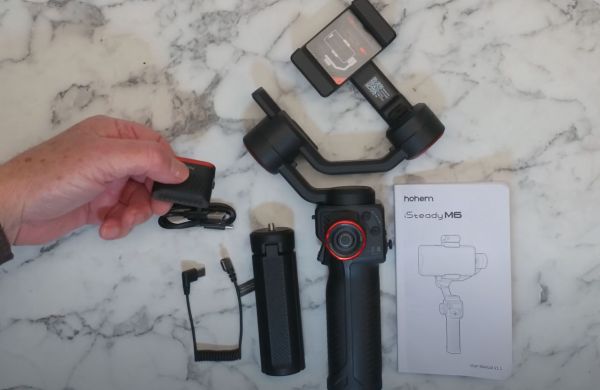
The iSteady M6 Gimbal: A Great Way to Upgrade Your Smartphone Videography
The iSteady M6 gimbal is a powerful tool that can help you take your smartphone videography to the next level. With its 3-axis stabilization, it can help you create smooth, professional-looking videos with minimal effort.
Here are some of the features that make the iSteady M6 gimbal so great:
3-axis stabilization:This means that the gimbal can stabilize your smartphone in all three directions: pitch, roll, and yaw. This helps to eliminate camera shake and jitter, resulting in smooth, stable videos.
Panorama mode:This mode allows you to create stunning panoramic videos with ease. Simply hold the gimbal steady and it will automatically pan the camera to capture a wide view.
Timelapse mode:This mode allows you to create stunning timelapse videos with ease. Simply set the interval and the gimbal will automatically capture a series of images at a set interval.
Object tracking:This mode allows you to track a moving object with the camera. Simply select the object and the gimbal will automatically track it, keeping it in the center of the frame.
Voice control:This mode allows you to control the gimbal with your voice. Simply say the command and the gimbal will execute it.
I have used many different smartphone gimbals over the years, and the iSteady M6 is by far the best one I have ever used. It is easy to use, provides excellent stabilization, and has a wide range of features. If you are looking for a way to upgrade your smartphone videography, the iSteady M6 gimbal is a great option.
The iSteady M6 gimbal is compatible with most smartphones.
It is lightweight and portable, making it easy to carry around.
It has a long battery life, so you can use it for extended periods of time.
It comes with a carrying case and a variety of accessories.
Overall, the iSteady M6 gimbal is a great value for the price. It is a powerful tool that can help you take your smartphone videography to the next level.
Order your Hohem iSteady M6 Kit today from the Ebay links below.
How to Balance a Smartphone Gimbal in Landscape Mode
A smartphone gimbal is a great way to create smooth and steady footage, even when you're moving around. But in order to get the best results, it's important to make sure that your gimbal is balanced properly.
In this tutorial, I'll show you how to balance your smartphone gimbal in landscape mode using the Hohem iSteady M6 gimbal.
Here are the steps:
Attach your smartphone to the gimbal.
Make sure that the smartphone is centered in the gimbal and that the weight is evenly distributed.
Use the gimbal's balancing knobs to adjust the weight until the gimbal is balanced.
Once the gimbal is balanced, you can start recording your footage.
Here are some additional tips for balancing your smartphone gimbal:
Make sure that your smartphone is turned off or in airplane mode before you start balancing the gimbal. This will help to prevent the gimbal from being affected by any vibrations from the phone.
If you're having trouble balancing the gimbal, you can try using a counterweight. A counterweight is a small weight that you can attach to the gimbal to help balance the weight of the smartphone.
Once the gimbal is balanced, you should not need to adjust the balancing knobs again unless you change the weight of the smartphone or the gimbal itself.
By following these steps, you can easily balance your smartphone gimbal in landscape mode and start creating smooth and steady footage.
I was asked to make a quick how-to video on balancing a smartphone on the Hohemi Steady M6 Gimbal Kit. If you follow my video tutorial, you'll be able to balance your smartphone on the iSteady M6 perfectly.
How to Charge Your Samsung Galaxy S22 Smartphone with the Hohem iSteady M6 Gimbal
The Hohem iSteady M6 is a 3-axis smartphone gimbal that supports reverse charging. This means that you can use the gimbal to charge your Samsung Galaxy S22 smartphone while you are recording video.
To charge your phone with the iSteady M6, follow these steps:
Make sure that the gimbal is turned on.
Connect the included USB-C cable to the power-out port on the gimbal.
Connect the other end of the USB-C cable to your phone's charging port.
Your phone will start charging.
Here are some additional things to keep in mind:
The iSteady M6 can only charge your phone at a rate of 5W. This is not as fast as a dedicated wall charger, but it is enough to keep your phone topped up while you are recording video.
You can only use the reverse charging feature when the gimbal is turned on.
If you are using the gimbal to record video, you may want to lower the quality of the video to conserve battery power.